
Will an RTK Robot Mower Work Under Trees? Check Your Yard First
Check an RTK robot mower under trees with a yard sketch and eight buying questions covering satellite reception, Navimow vision and antenna placement.
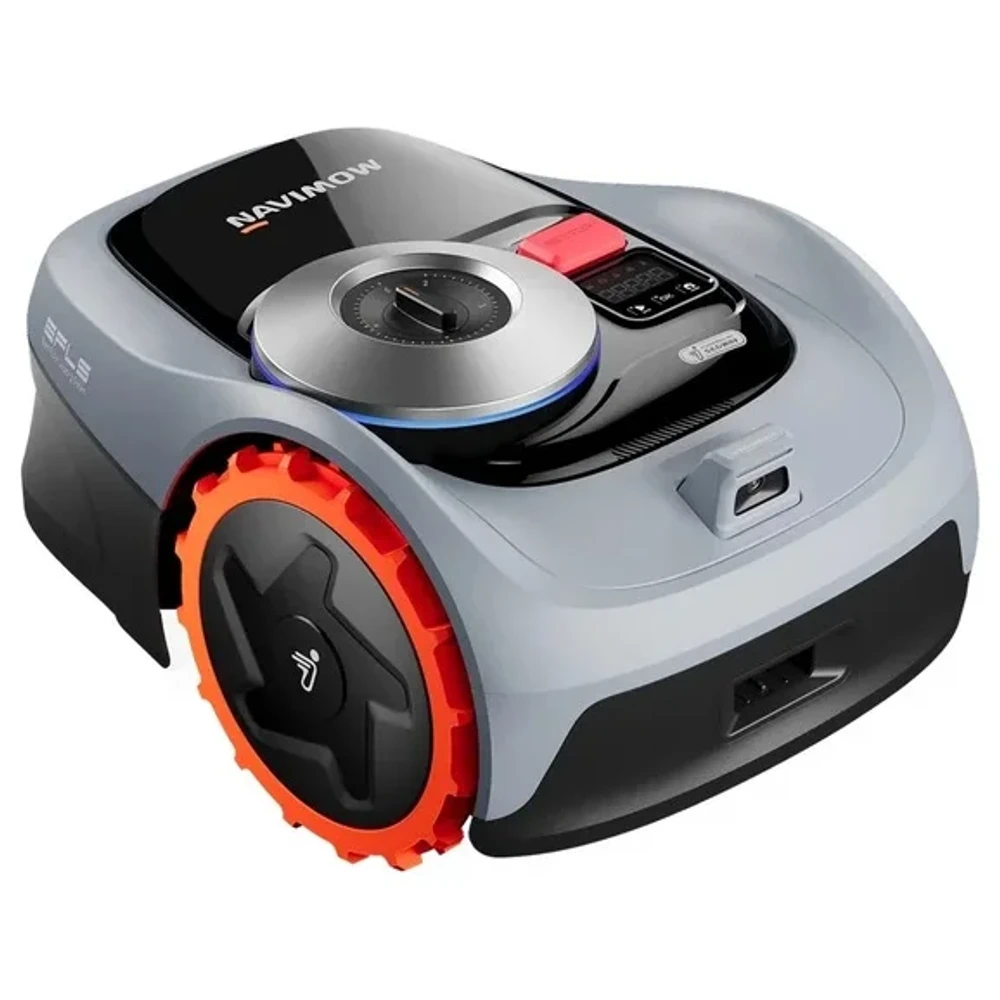
An RTK robot mower can work under some trees. The answer depends on reception along its route and how that particular model handles weak satellite signals. Before buying, check the canopy over the grass, the antenna location and the charging station separately. The shaded strip behind the house needs its own check even if the open lawn beside the dock looks straightforward.
We checked Navimow's current US product and support pages, plus Husqvarna's UK support guidance, on October 29, 2026 (UTC). The US example here is the Navimow i105 in the i1 family. The i2 AWD Network RTK information below belongs to a different model. We have not tested a mower in this yard or measured its signal. The sketch and checklist below are tools for your own site assessment.
Our Segway Navimow product page provides a directory reference. Write the full regional model name on your yard notes. Navimow's i1 installation advice and its i2 AWD Network RTK advice apply to different equipment.
Mark the parts of your yard with overhead obstruction
Draw your house and the grass around it on a sheet of paper. Add the roof overhangs. Mark each tree's canopy as well as its trunk, then add walls and hedges along the route between lawn sections. Give each suspect spot a letter that you can also put on a photo or error record.
The template below uses an invented yard. Shading marks places to investigate. All candidate positions still need assessment; the drawing gives no clearance distances or reception measurements.
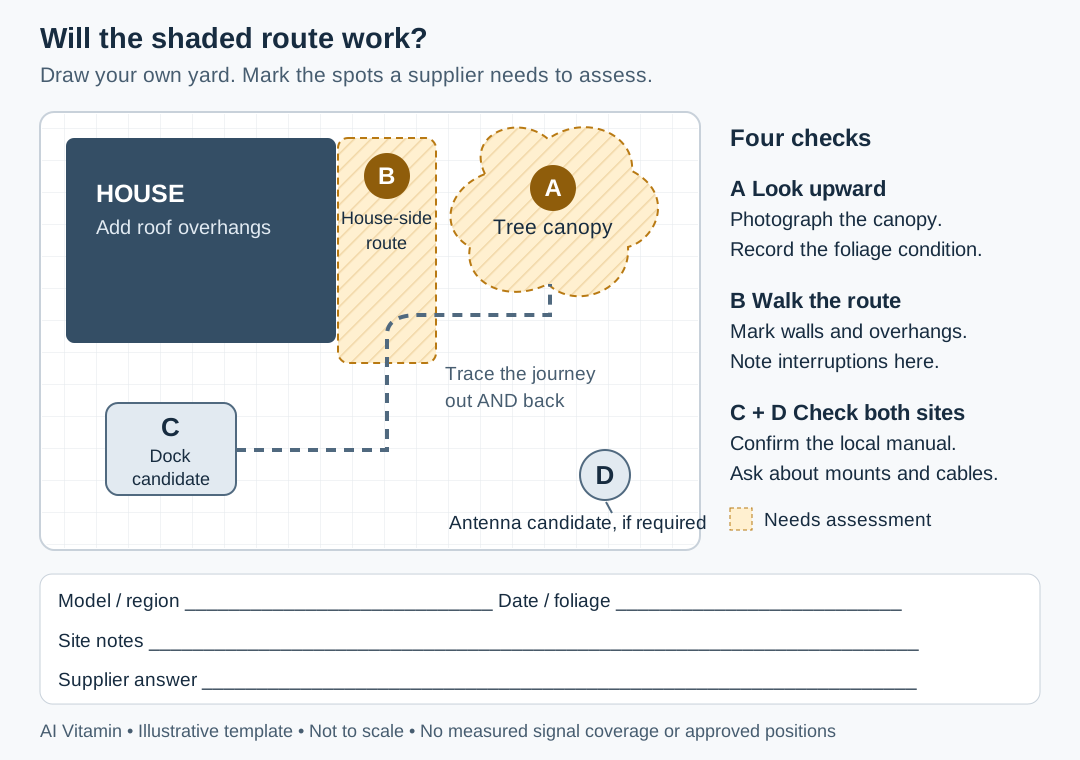
Original AI Vitamin diagram. Illustrative layout, not to scale. A and B require checks; C and D are unverified candidate locations.
Open the yard sketch template to print or mark up. Replace the example layout with your own, keeping four labels.
| Mark | Record at that location | Evidence to collect |
|---|---|---|
| A | Tree canopy above the grass, including overlapping branches | Ground-level photos looking upward; date and whether leaves are present |
| B | Route beside a wall, hedge or roof overhang | Photos along both travel directions; where an existing mower stops |
| C | Candidate charging station and its approach | Photo of the sky above it and the approach back from each lawn section |
| D | Candidate physical GNSS antenna | Views around and above it; proposed mount and cable route |
For an existing mower, write down whether it stops while mowing at A, crossing B or returning to C. Keep the exact error message and time. That record lets support distinguish a mowing interruption from a problem reaching the next zone or docking.
Take leaf-on photos when possible. If you inspect a bare tree in fall, record that condition and ask whether the proposed installation needs a later check with foliage present.
Check the antenna, mower route, and docking point
Navimow's i1 charging-station and GNSS antenna guidance asks for an open location, with no trees or roofs obstructing the sky directly above the antenna and station. It also recommends avoiding walls that block the view in any direction.
For a Northern Hemisphere installation where all-around openness is impossible, the same guidance prioritizes a clear southern sky and says to keep east and west clear if possible. This advice belongs to the i1 documentation. Use the installation manual for the exact mower you are considering before assigning a clearance distance or buying a mount.
The page suggests an extension pole first if the initial placement does not work, followed by the Antenna Extension Kit for a roof location if needed. Ask the installer to confirm the compatible kit, mounting arrangement and cable route. Mark the proposed change at D so support can see what it would improve.
After choosing an antenna site, trace the journey from C through B to A and back again. Ask the dealer to demonstrate that journey. Record the return to the dock as well as mowing under the branches.
Keep app connectivity on a separate line of your notes. The US Navimow i105 product page lists Wi-Fi and Bluetooth, with optional 4G through a separately purchased Access+ module. Working remote controls do not demonstrate good positioning under a canopy. That optional module also does not establish that the i1 supports another model's Network RTK service.
Compare model-specific backup navigation options
A robot mower RTK vs vision comparison needs to identify what the camera does. The i105 page describes EFLS 2.0 as a positioning system that combines RTK and vision. It says Visual SLAM lets the camera create 3D maps and improve performance where satellite signals are weak. The page separately describes VisionFence obstacle avoidance. Ask about navigation during weak reception, as well as the camera's ability to recognize objects.
Take the same marked trouble spot to each supplier. Their proposed fixes may involve different equipment.
| Documented option | What the checked source supports | What still needs a site answer |
|---|---|---|
| Navimow US i105, i1 family | EFLS 2.0 combines RTK and visual positioning | Whether this canopy and route allow mowing and return to dock with the installed software |
| Navimow i2 AWD Network RTK | A separate correction service with region-dependent availability | Coverage at the service address, required connection, accessories and current fees |
| Selected Husqvarna NERA models with EPOS | UK guidance offers Support by Wire for weak-satellite areas | Regional model compatibility and whether a physical loop can be installed at the affected spot |
Navimow's i2 AWD Network RTK FAQ uses Network RTK, Net-RTK and NRTK for the same service. It warns that many North American regions still lack full coverage. Confirm your address before relying on a cloud or network correction service. Ask for an address-specific answer, including the connection the service needs and any current charges.
The i2 AWD charging-station FAQ says installation requirements remain the same in NRTK and local RTK modes. It warns that losing the station connection for an extended period can interrupt mowing. Include C and its return route in the assessment even when the quote specifies Network RTK.
Husqvarna provides a useful external example of a different solution. Its UK Support by Wire guide describes a physical loop for weak-satellite spots such as dense tree groups. It lists seven EPOS-equipped NERA models, including 305E NERA and 430X NERA. The same guide says AI vision models do not support Support by Wire and instead use their built-in camera in weak-signal areas. Use that UK guide to understand the mechanism. A US buyer needs confirmation for the local model; Support by Wire is a Husqvarna feature, with its own compatibility list.
Ask for a site-fit assessment before buying
Send the labeled sketch and photos to the manufacturer or local dealer. Ask them to address the shaded route and return journey in writing. Use these eight questions to make the assessment specific.
| # | Ask before buying | Keep with the answer |
|---|---|---|
| 1 | What exact US model and positioning system are you quoting? | Full model code, local manual and proposed firmware or app requirements |
| 2 | Which canopy or building obstructions at A and B need an on-site check? | Marked photos and any conditions the assessor could not evaluate |
| 3 | Where should the physical antenna go, if this model uses one? | Position D, approved mount, extension kit and cable plan |
| 4 | Does C meet the dock installation rules, including the return approach? | Approved dock position and a route from every planned lawn section |
| 5 | What does this model do when positioning becomes insufficient? | Documented visual or wire assistance, stopping behavior and recovery steps |
| 6 | Which correction and connectivity services work at my address? | Service region, required network, hardware, current charges and outage behavior |
| 7 | Can you demonstrate A to B and the return to C in representative conditions? | Date, foliage condition, route, installed versions and any interruptions |
| 8 | What happens if the assessed installation cannot mow those areas reliably? | Written installation scope, support process and applicable return terms |
Leave unanswered cells open. A site demonstration can establish what happened on that route, with that setup and foliage condition. Record any untested sections rather than treating one completed pass as proof for the whole yard.
Our home and companion robots directory covers the wider category. Before accepting a mower installation, attach the marked plan to the quotation and ask the supplier to identify any section they have left unassessed.